Bringing Live Subtitles to Meetups
On February 10th, 2026 I had the chance to speak at the AWS User Group Lisbon meetup about a small side‑project that tries to solve a very real problem: making live presentations more accessible through real‑time subtitles.
If you want to watch the full talk, it’s available on YouTube.
You can also check the presentation here:
In this post I’ll give a bit of background, walk through how the prototype works, and share where we (me and Tiago) want to take it next.
The Problem: Accessibility Is Still Hard in Real Life
Online we’re spoiled with great subtitles, but in‑person events are still mostly inaccessible if you:
- are hard of hearing or deaf
- are not fluent in the language of the talk
- prefer reading along instead of listening
Most existing solutions require:
- software installation on the speaker’s laptop
- complex audio routing (virtual devices, mixer apps, drivers)
- dedicated AV staff to set everything up
- or live human captioners typing along during the talk
For meetups and community events this is usually too much. We wanted something that felt like an HDMI dongle: plug it in and subtitles just appear.
The Idea: A Plug‑and‑Play “Transcribe Box”
The concept is simple:
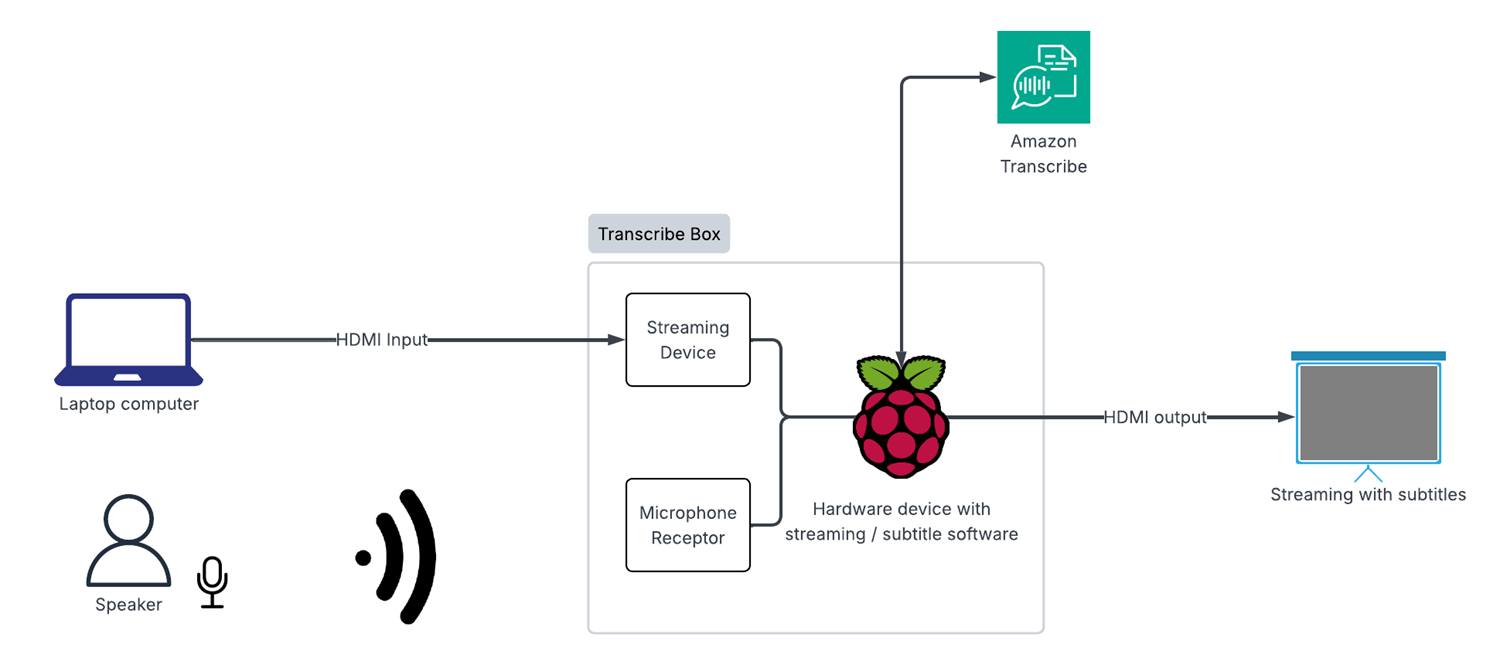
- The speaker connects their laptop’s HDMI output into a small box.
- The box captures video and audio, sends the audio to AWS Transcribe, and overlays subtitles on top of the video.
- The box outputs HDMI back to the projector/TV, with live subtitles on the slides.
No software to install on the speaker’s machine. No accounts to configure. Just plug, power on, and start talking.
Hardware Setup
For the prototype we used:
- Raspberry Pi as the main compute device
- USB HDMI capture card to ingest the laptop video + audio
- USB microphone (optional fallback if HDMI audio is not available)
- HDMI output from the Pi to the projector or screen
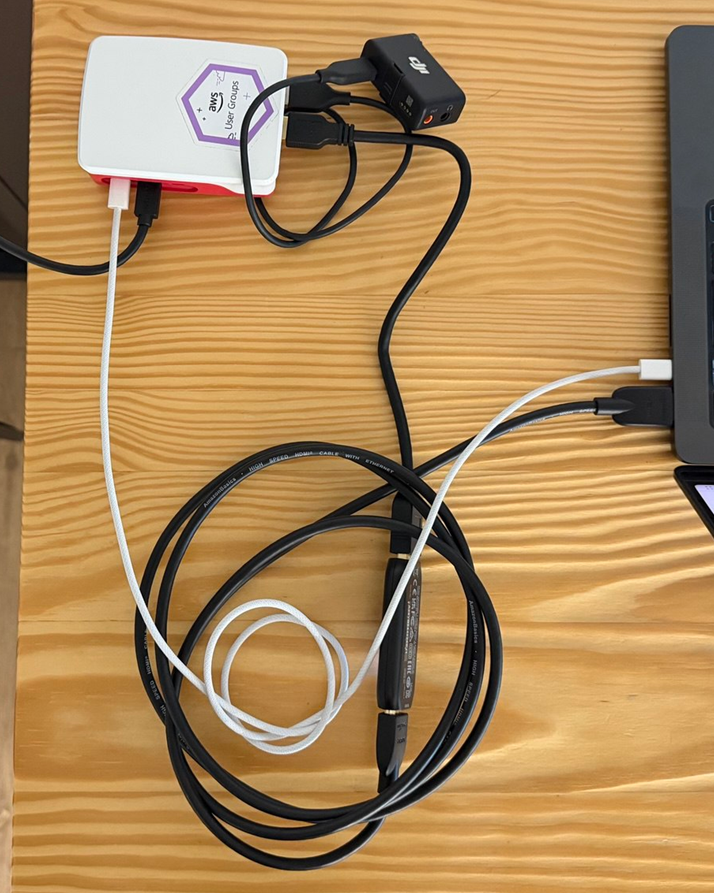
On the desk it looks like a small “subtitle box” with a few cables: HDMI in, HDMI out, power, and sometimes a USB mic.
High‑Level Architecture
At a very high level the stack looks like this:
HDMI video capture & output (Python + GStreamer)
- A Python app (
gst-subtitle-app.py) reads the HDMI input (/dev/video0) on the Pi - Uses GStreamer to scale and render the video
- Draws a text overlay with the latest subtitle text
- Sends the final video to the projector/TV via the Pi’s HDMI output
- A Python app (
Audio capture & transcription (Node.js)
- A Node.js service (
transcribe-node.js) captures audio from the wireless microphone (or other ALSA devices) - Resamples audio to the format expected by Amazon Transcribe
- Maintains a long‑lived streaming connection to Transcribe and receives partial/final results
- Decides what text should be shown on screen at any moment
- A Node.js service (
Glue between them (subtitle file)
- Node.js writes the current subtitle into a small text file under
/tmp - The Python GStreamer app watches this file and updates the on‑screen text whenever it changes
- Node.js writes the current subtitle into a small text file under
The whole thing runs on a single Raspberry Pi. From the outside it behaves like a transparent HDMI passthrough—just with subtitles magically added.
Implementation Details
Audio Capture and AWS Transcribe
The audio capture process:
- Reads raw audio samples from the HDMI capture card (or USB mic).
- Encodes audio to the format expected by Amazon Transcribe Streaming.
- Streams audio chunks over a long‑lived WebSocket connection.
- Receives incremental transcription events with timestamps and confidence scores.
I use partial results to show text as soon as possible, and then replace them when the final result arrives to improve accuracy.
The Node.js Transcription Service
Inside the project there’s a small Node.js service that handles the live transcription part.
- Runtime: Node.js 16+
- Entry point:
transcribe-node.js - Main dependencies:
@aws-sdk/client-transcribe-streamingandmic
Roughly speaking this service:
- detects the wireless microphone (or falls back to default ALSA devices)
- resamples audio from 48 kHz stereo to 16 kHz mono (what AWS Transcribe expects)
- opens a streaming transcription session with Amazon Transcribe
- writes the current subtitle line into
/tmp/current_subtitle.txt, which is then picked up by a small Pythongst-subtitle-app.pyhelper to update the GStreamer overlay
I control behaviour mainly through environment variables, for example:
AWS_REGION– AWS region (defaulteu-west-1)LANGUAGE_CODE– fixed transcription language, e.g.en-US,pt-PTENABLE_MULTI_LANGUAGE,LANGUAGE_OPTIONS,PREFERRED_LANGUAGE– experimental multi‑language detectionSHOW_SPEAKER_LABELS,MAX_SPEAKER_LABELS– enable speaker diarization when supportedAUDIO_DEVICE_NAME– force a specific ALSA device instead of auto‑detecting the wireless mic
Subtitles on Screen with GStreamer
To draw subtitles on top of the video I use GStreamer pipelines on the Pi:
- The incoming HDMI capture is decoded as a video stream.
- A text overlay element renders the latest subtitle line(s).
- The composed stream is sent to the HDMI output.
The Node.js process listens for new text from Transcribe and updates the overlay through GStreamer’s APIs. This lets me control:
- font size and colour
- background box for readability
- position of subtitles on the screen
A small demonstration video:
Why Raspberry Pi + Python + Node.js?
- Raspberry Pi is cheap, portable, and well supported in the community.
- Python has great libraries and SDKs for dealing with AWS services and low‑level audio/video tasks.
- Node.js integrates nicely with web protocols and offers good bindings for GStreamer, which I use for the video pipeline and overlay logic.
Current Limitations
This is still a prototype, and there are some rough edges:
- Latency can vary depending on the network connection.
- The UI is basically non‑existent—everything is controlled through config files or SSH.
- It only supports one language at a time, with no translation.
- Packaging and cabling are not yet friendly for non‑technical users.
Even so, the feedback from the meetup was very positive. People could easily follow the talk from the back of the room, some attendees immediately saw uses in classrooms and conferences and some were ready to buy it!
Roadmap and Future Work
Short‑Term Improvements
Live translation
- Use AWS services (for example, Translate) to generate subtitles in multiple target languages in real time.
- Allow the audience to choose their preferred language on a secondary screen or companion web interface.
Multi‑language support
- Detect the language on the fly and switch the transcription model accordingly.
- Support bilingual talks and Q&A sessions.
Multiple speaker detection
- Use speaker diarization to label who is speaking.
- Visually distinguish between the presenter and audience questions in the subtitles.
Long‑Term Vision
The long‑term goal is to turn the prototype into a product‑ready device:
True plug‑and‑play
- No SSH, no manual Wi‑Fi config, no terminal.
- Just connect HDMI and power, then it works.
Custom enclosure
- A robust, portable case that can live in a backpack or AV rack.
- Clear ports labelled “HDMI IN / HDMI OUT / POWER”.
Simple physical controls
- Power button
- Language selector (e.g. a small screen or rotary switch to pick subtitle language)
Production‑ready hardware
- Reliable components
- Easier to manufacture, maintain, and ship
- Potential to share as an open‑source design or kit
Wrapping Up
This project started from a simple question: how can we make meetups more inclusive without adding a lot of friction for organisers and speakers? A small Raspberry Pi, some Python/Node.js, and AWS Transcribe turned out to be a surprisingly powerful combo.
If you’re interested in collaborating, trying it at your own meetup, or helping with the next iteration (translation, multi‑language, or hardware design), feel free to reach out.